01 / Getting to know you
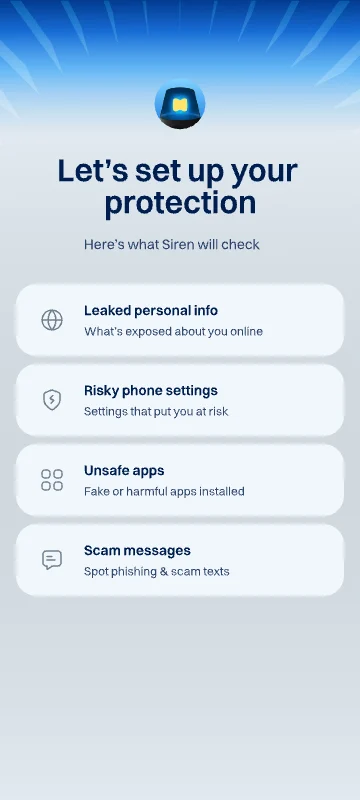
Sample details arrive after three seconds. Finish setup to see the final transition.

Siren / CLIENT PROJECT
Onboarding, scanning, and safety scores for Siren. Rive motion that responds to what the app knows, and knows when to wait.
ANIMATION BY
Piyush KachaMY ROLE
Rive animation · State machines · Data binding · Developer handoff
100K+
App downloads on Google Play
4.8 / 5
App rating on Google Play
4
Interactive animation flows
Google Play · App statistics checked September 18, 2026.
BEHIND THE MOTION
Siren is a scam safety app covering calls, messages, links, and device risks. I created a series of Rive animations for its onboarding and safety checks. The brief was to make setup feel like the app was already working for you, with clear feedback as information arrived.
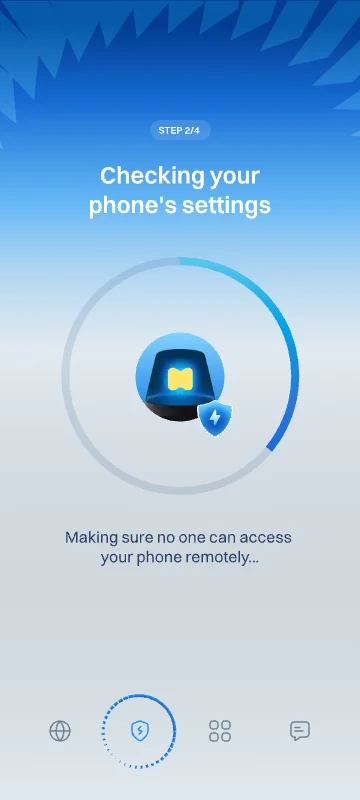
An API response does not arrive on a fixed animation timeline. The scan needs to stay alive for as long as the check takes, then move naturally into the result. I built holding states and transitions driven by real-time data binding, with separate success and warning outcomes.
The progress ring, step counter, and tab indicator follow the same state. The first part of setup responds as details become available; the later scan holds until the final result is ready. The screen copy is data-bound too, so the app can supply the values instead of relying on text baked into a video.
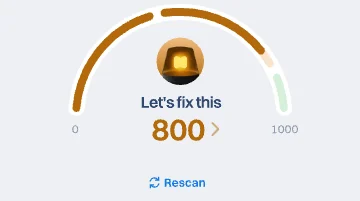
The compact safety component responds to a new score and has its own rescan sequence. Named properties and triggers let the app choose the next value or begin another check. Together, the files give the development team interactive motion they can drive directly from product state.
THE ONBOARDING FLOW
Three moments from the same journey, using sample data and simulated responses. The full files also bind their text to app data. Here, the controls focus on the animation states.
Sample details arrive after three seconds. Finish setup to see the final transition.
Start the scan, then send a success or warning response. Replay to try the other outcome.
The scan starts on its own and holds until you reveal the final score.
All four previews use MainViewModel. The onboarding setup fires triggerApiResponded after three seconds of visible playback and exposes triggerComplete. The shared scanning file runs in mode 0 for the email scan and mode 1 for the final scan, firing triggerStart automatically in each instance. Email success and warning flags are mutually exclusive; Replay resets the flow. The score control binds nextScore from 0–100 and maps it to totalDisplay on the artwork’s 0–1000 scale when Show score is pressed. Show score and Rescan each reset the runtime before firing their respective trigger. The homepage preview fires triggerRescan once after one second of visible playback. All timers stop while paused, offscreen, or in a hidden tab. Text bindings remain available in the files; the public controls deliberately focus on the key states.
| Animation | Artboard | State machine / view model | Controls / timelines |
|---|---|---|---|
| A safety score that responds | LinkCheckerReScan | Main State MachineMainViewModel | triggerNextScore, triggerRescan, triggerRescan (auto), nextScore |
| 01 / Getting to know you | OnboardingV2 | Main State MachineMainViewModel | triggerComplete, triggerApiResponded (auto) |
| 02 / Waiting for a real result | OnboardingStep2Step3 | Main State MachineMainViewModel | triggerStartScan, isApiRespondedForEmailSuccess, isApiRespondedForEmailWarn, triggerStart (auto), mode = 0 |
| 03 / The bigger picture | OnboardingStep2Step3 | Main State MachineMainViewModel | isFinalScanDone, triggerStart (auto), mode = 1 |
UP NEXT
Payment plans